Last updated: August 21, 2026
There are two ways to end up watching birds on your phone. You can buy a feeder with the camera built into the housing, aimed at the perch and wired to an app that names what it sees. Or you can keep the feeder you already like and point a separate camera at it, which is what wildlife photographers and a lot of long time feeders quietly do.
They produce different results, and neither is a compromise version of the other. The built in camera gives you portraits and species labels with no setup thinking. The added camera gives you the whole feeder, the ground below it, the squirrel on the pole and the hawk that cleared the yard, at the cost of doing the framing yourself. This is a comparison of which one fits which person.
This article contains affiliate links. If you buy through them, we may earn a commission at no extra cost to you. Learn more.
Quick Answer
Built in camera, or a camera you add yourself?
- Built in gives you close portraits and automatic species names with no aiming or focusing.
- An added camera gives you the wider scene and works with any feeder you already own.
- Built in ties you to one brand’s app and its plan; an added camera does not.
- Built in is one object to charge and clean; an added camera is two to mount and maintain.
Bottom line: want the bird’s face and a name, buy built in. Want to see what is happening in the yard, add a camera.
What Each Setup Actually Delivers
A built in camera sits inches from a fixed perch, focused permanently on that spot. Every clip is a close portrait of one bird, framed identically, with a species guess attached. An added camera sits a few feet back and sees the whole feeder, so you get context, behavior and everything else that visits.
Neither view is better in the abstract. If what you enjoy is the detail of a nuthatch’s face, the built in camera is the product designed for that. If what you enjoy is watching a jay bully three doves off a platform, a wider camera is the only one that shows it.
Where Built In Wins
Convenience and identification. Everything is aimed, focused and configured out of the box, the app is written for birds rather than for security, and the species labels arrive without you doing anything. For most people that is the entire appeal, and it is a real one.
It also wins on framing consistency. Because the perch is always the same distance from the lens, the exposure and focus are right nearly every time, which is much harder to achieve with a general purpose camera pointed across a lawn.
The Cost of That Convenience
You are buying into one brand’s ecosystem. The app, the plan, the storage rules and the future of the product all belong to that company, and if any of it changes you change with it. You also get one fixed view forever, and if you later want the wider scene you are buying a second device anyway.
Where Adding Your Own Camera Wins
Flexibility. You keep the feeder that already suits your birds, whether that is a hopper, a caged tube or a platform, and you can move the camera, change the angle, or point it at a suet feeder in winter and a bird bath in July. Nothing is fixed by the manufacturer.
It also covers what built in cameras structurally cannot see: ground feeding birds, the base of the pole, the squirrel route, and multiple feeders in one frame. If your question is what is happening in my yard rather than what does that bird look like, this is the setup that answers it.
What You Give Up
Automatic species identification, mostly, along with the neatness of one object. General purpose outdoor cameras label people and animals rather than birds, so the naming is on you. Focus at feeder distance can also be an issue, since many security cameras are set for a wider scene.
The Two Setups Side by Side
The differences that show up in daily use, rather than the ones on a spec sheet.
| Question | Built in camera feeder | Feeder plus separate camera | Who cares most |
|---|---|---|---|
| What you see | One bird, close, always framed | The whole feeder and its surroundings | Portrait collectors versus yard watchers |
| Species naming | Automatic, brand app | Manual, or a separate app | Beginners learning the yard birds |
| Flexibility | Fixed view, fixed feeder | Any feeder, any angle, movable | People who already own feeders |
| Things to maintain | One unit to charge and clean | Two mounts, two batteries | Anyone who dislikes fiddling |
Picking a Built In Model
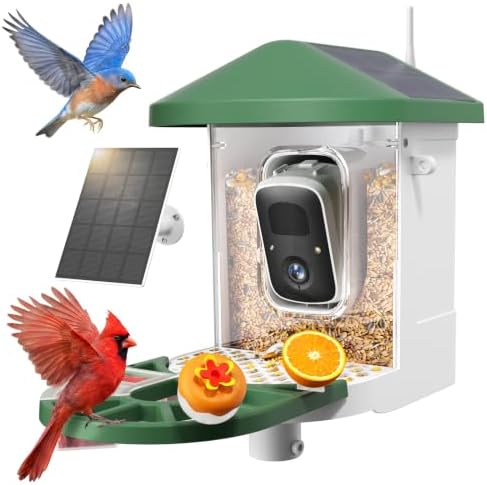
If built in is the answer, the decisions that matter are power, plan and mounting rather than resolution. A solar roof with a detachable camera module handles most yards, and the app plan should be checked on the listing rather than assumed. Our main camera feeder guide covers the full checklist.
The Hanging Versus Pole Question
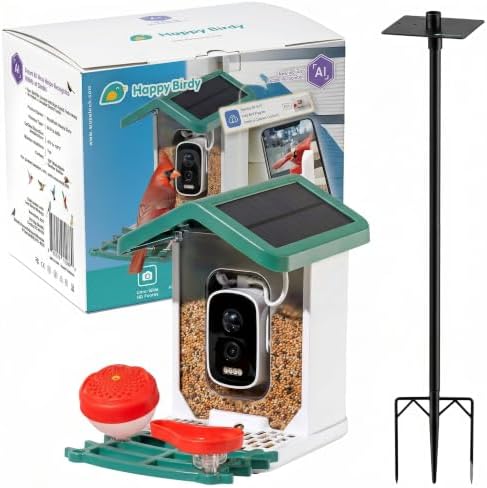
Built in camera feeders are sold both to hang and to mount on a pole, and pole mounting produces better footage because the feeder does not swing. If the model comes with both a strap and a pole adapter, use the pole. See where to mount a camera feeder for the angles that work.
Adding a Camera to a Feeder You Own
The practical approach is a weatherproof outdoor camera on its own small stake or bracket, a few feet from the feeder, aimed so the perch sits in the middle of the frame with the background falling away behind it. Check that the camera can focus at that distance, since many are built for wider scenes.
Power and storage are your decisions here rather than the brand’s, which is the point. A camera that records to a card avoids subscriptions entirely, and the same camera can be repointed at a bird bath or a nest box when the season changes.

Running Both
Plenty of people end up with both, and it is a sensible destination rather than an indulgence. The built in feeder handles portraits and identification, and a wider camera a few feet back covers the ground birds, the squirrel traffic and the occasional hawk that empties the yard for a fortnight.
If you go that way, put the wider camera where it can see the base of the pole as well as the feeder. That is where most of the interesting problems happen, from spilled seed attracting rodents to a raccoon working out how to climb a baffle at two in the morning.
Frequently Asked Questions
Can I attach a security camera to a feeder I already have? Yes, on a nearby stake or bracket rather than on the feeder itself, since a camera mounted on a swinging feeder produces unusable clips. Check the camera’s minimum focus distance before choosing the spot.
Do built in cameras take better pictures? At the perch, yes, because the lens is designed for that exact distance. A general purpose camera at the same distance is often soft, and at a comfortable distance it shows a much smaller bird in the frame.
Which is cheaper overall? That depends on what you already own and on whether a plan is involved, so we deliberately do not compare running costs here. What is worth comparing is whether the camera you add can avoid a subscription by recording to a card.
Will a built in camera feeder work with my existing feeders? No. It replaces one feeder rather than adding to it. If your yard birds are attached to a particular feeder, adding a separate camera keeps that arrangement intact.
Which one identifies birds better? The built in feeder, since its app is trained for birds. A general purpose camera app will tell you an animal appeared. Details of how the identification works are in how camera feeders identify birds.
What about hummingbirds? Neither general option handles them well. Hummingbirds need a much closer focus and a faster trigger, which is why hummingbird camera feeders are built as a separate product.
The Bottom Line
Built in cameras buy you close portraits, automatic names and no setup thinking, at the price of a fixed view and one brand’s app. Adding your own camera buys you the whole yard and total flexibility, at the price of doing the framing and the naming yourself. Choose on which view you actually want to watch. Read next: our main camera feeder guide, and what makes a feeder smart for the software side.