Last updated: August 21, 2026
The single most common disappointment with a camera feeder has nothing to do with the camera. It is that the feeder sits at the bottom of the yard, the router sits in the front room, and between them are two brick walls and a kitchen. The app connects when you stand next to the feeder holding your phone, and then drops out for hours at a time once you go inside.
This is fixable, and it is much easier to fix before you have mounted anything. Wifi behaves in ways that are unintuitive, particularly around bands and obstacles, and a few minutes of testing with a phone will tell you more than any range figure in a listing. This guide covers how to test, what to change, and how to buy a feeder that survives a shaky connection.
This article contains affiliate links. If you buy through them, we may earn a commission at no extra cost to you. Learn more.
Quick Answer
How much wifi does a bird feeder with camera need?
- A steady 2.4GHz signal at the feeder location, which travels through walls better than 5GHz.
- Enough upload speed to push short clips, which matters more than download speed does.
- A network name the feeder can join. Some cannot connect to combined band networks or guest networks.
- A fallback, ideally recording to a memory card, so a dropout costs you the live view and not the footage.
Bottom line: test the spot with a phone before you mount anything, and prefer a feeder that keeps recording when the link drops.
Why These Feeders Use the Slower Band
Almost all camera feeders connect on 2.4GHz rather than 5GHz. That looks like a downgrade and is not. The lower frequency travels further and passes through walls, siding and wet foliage far better, and a feeder only needs to send short clips rather than stream a film. Range beats raw speed for this job.
The practical consequence is that your feeder needs to see the 2.4GHz network specifically. On many modern routers both bands share one name, and while most devices cope, some feeders get confused during setup. If pairing keeps failing, splitting the bands temporarily, or using a guest network limited to 2.4GHz, is the usual fix.
Test the Spot Before You Mount Anything
Stand where the feeder will hang, holding your phone at the same height, connected to the 2.4GHz network. Run a speed test and watch the upload figure, then try a video call. If the call holds for a minute without stuttering, a camera feeder will almost certainly be fine there.
Do the test in the season you will use it. Wet leaves and full summer foliage absorb signal, so a spot that tests well in February can be marginal in July. If the result is borderline, that is the moment to plan for an extender rather than after you have drilled a pole into the lawn.
Improving a Marginal Spot
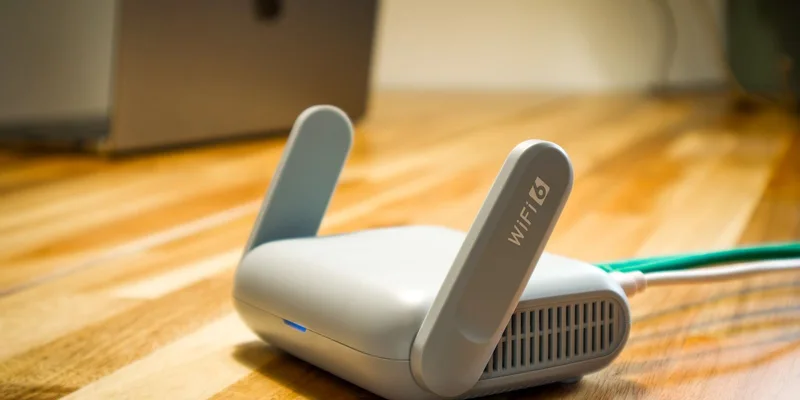
A mesh node or an extender placed in a back room, or in a garage facing the yard, usually solves it. Aim for line of sight through a window rather than through an exterior wall, since glass is much kinder to a signal than brick or foil backed insulation. Outdoor rated access points exist if the yard is large.
WiFi Camera Feeders by Situation
Best All Around Choice for a Normal Yard
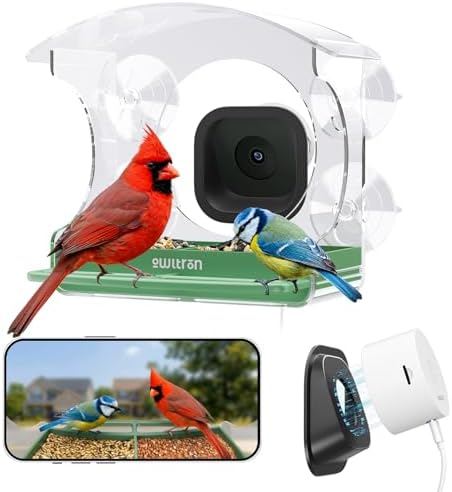
For a feeder within reasonable reach of the house, a standard 2.4GHz camera feeder with solar and app alerts is all you need. The connection is rarely the limiting factor at that distance, and you can spend the decision on power and plan instead.

When the Feeder Is at the Far End of the Yard
Choose a model that records locally to a memory card, so dropouts cost you the live view rather than the clips. Pair it with a mesh node near the back of the house. That combination behaves far better than a cloud only feeder at the edge of coverage.
If Your Router Is the Problem
Where the house has one aging router and thick walls, a mesh point or an extender aimed at the yard is the cheaper fix by a wide margin, and it improves everything else outdoors at the same time. Position it with a window between it and the feeder if you can.

What Dropouts Actually Cost You
It depends entirely on where the feeder stores things. On a cloud first model a dropout means no clip, no alert and no species name for that visit, and the bird is simply missing from the log. On a model with local recording the clip is on the card and syncs later, so you lose immediacy rather than the memory.
Battery is the second cost. A feeder that keeps trying to reconnect burns power, which is why a marginal signal often shows up first as a battery that suddenly drains faster than it used to. If runtime drops without any change in bird traffic, check the connection before blaming the panel. Our guide to what drains the battery covers the pattern.
Comparing Connection Setups
Four ways people connect a camera feeder, and how each holds up when the signal is imperfect.
| Setup | Behavior at range | What a dropout costs | Suits |
|---|---|---|---|
| Router only, cloud storage | Fine near the house, poor far out | The clip, the alert and the name | Feeders within sight of the router |
| Mesh node toward the yard | Reliable across most lots | Rarely an issue | Any yard where the signal is weak |
| Local card plus cloud | Tolerant of a weak link | Live view only, footage is safe | Far corners and wooded lots |
| Guest or separate 2.4GHz network | Depends on the router | Same as the parent setup | Feeders that will not pair otherwise |
Setup Problems and Their Usual Causes
Most pairing failures come down to three things: the phone was on 5GHz while the feeder was looking for 2.4GHz, the password contained a character the feeder’s keyboard could not send, or the feeder was too far from the router during setup. Pair indoors next to the router first, then take the feeder out.
If the feeder connects and then keeps dropping at its final position, the position is the problem rather than the feeder. Move it ten feet closer to the house and see whether the drops stop. That test tells you whether to buy an extender or to look for a different mounting spot, and it is quicker than any support call.
Frequently Asked Questions
Do bird feeder cameras work on 5GHz? Most connect on 2.4GHz only, because that band reaches further and passes through walls better. A few dual band models exist. If setup fails, check that your phone is on the 2.4GHz network while pairing.
How far can the feeder be from the router? There is no honest number, because walls, siding and foliage matter more than distance. Test the exact spot with a phone on the same band and watch upload speed, then mount only if a video call holds steadily.
Will an extender fix a weak signal? Usually, if you place it so the signal reaches the feeder through a window rather than through an exterior wall. A mesh node in a back room aimed at the yard is the most common working setup.
Can a camera feeder work without wifi at all? Only models that record to a memory card, and even then you lose alerts, live view and species identification until it reconnects. Some cellular wildlife cameras exist, but they are a different product from a feeder camera.
Does a weak signal drain the battery? Yes. Repeated reconnection attempts and slow uploads both cost power, which is why a feeder at the edge of coverage often needs charging more often than the same model closer in.
Which feeder should I buy for a large yard? One with local recording, paired with a mesh node. Our main camera feeder guide covers the models built that way, and the brand comparison shows who supports card storage.
The Bottom Line
Test the mounting spot with a phone before you commit, expect 2.4GHz, and choose a feeder that records locally if the spot is anywhere near the edge of coverage. A mesh node aimed at the yard fixes more camera feeder complaints than any firmware update ever has. Read next: where to mount a camera feeder to combine signal with a good angle, and our main buying guide.